Why Managing Separate Ad Pixels for Shopify Is Killing Your ROAS
by Edward Upton
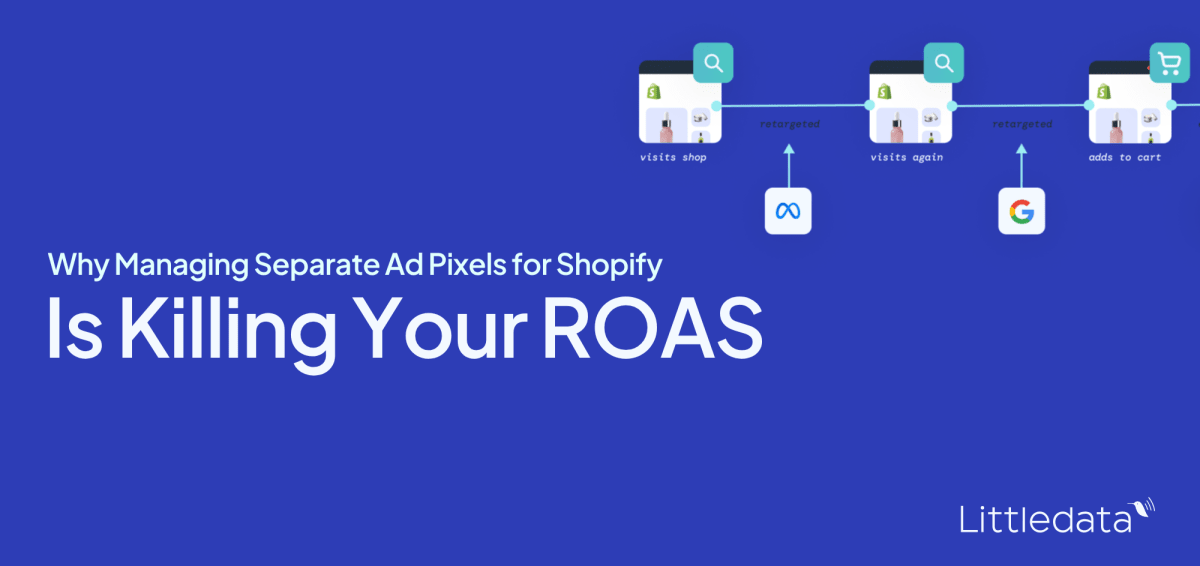
Meta, Google, and TikTok each claim the same Shopify orders under their own attribution rules. The result is inflated ROAS, misled bidding algorithms, and wasted spend. Here is why separate pixels fail, and how to fix the architecture.
You open Meta Ads Manager and see a 4.2x ROAS. You open Google Ads and see 3.8x. You open your Shopify dashboard and the revenue figure is roughly half of what the two platforms are claiming between them. Every channel looks profitable. The business is not growing.
This is the pixel fragmentation trap, and it catches almost every Shopify brand running ads across more than one platform.
When you manage separate browser pixels for Meta, Google, and TikTok, you are running three competing systems that each claim the same revenue, report it differently, and feed your ad algorithms contradictory signals. The result is inflated ROAS figures you cannot act on, optimization decisions based on corrupted data, and real ad spend wasted on audiences your systems are measuring incorrectly.
You cannot fix this by tweaking a tag. The problem sits in the data architecture itself, and understanding why it happens is the first step to fixing it.
How each platform defines a conversion (they all disagree)
The root of the problem is that Meta, Google, TikTok, and Shopify each have a different definition of what counts as a conversion, and when it happened.
Each platform receives the same order value from your Shopify store. Each platform then independently decides which of its ads deserve credit for that order, using its own attribution window and its own rules. As a result, the same purchase gets claimed multiple times across your stack.
Here is how the windows compare:
Platform | Default attribution window | View-through included?
- Meta | 7-day click, 1-day view | Yes
- Google Ads | 30-day click, 1-day view (Display/YouTube) | Partial
- TikTok | 7-day click, 1-day view | Yes
- Shopify | 30-day last non-direct click | No
A customer who saw a Meta ad on Monday, clicked a Google Search ad on Wednesday, and purchased on Thursday will appear in all three dashboards. Meta claims it because of the view. Google claims it because of the click. Shopify attributes it to Google because that was the last click. Add up the revenue each platform reports, and you will routinely exceed your actual Shopify revenue by 50% to 150%.
None of this is a malfunction. Incompatible measurement systems running in parallel produce exactly this output.
Why this matters for how your algorithms optimize
The damage goes beyond confusing reports. Every ad platform uses the conversion data it receives to train its bidding algorithm. Meta's Advantage+ campaigns, Google's Performance Max, and TikTok's Smart Performance Campaigns all rely on conversion signals to decide who to show your ads to and how much to bid.
When your pixel data is fragmented and inflated, those algorithms are optimizing against a fiction. Meta's algorithm thinks a campaign is performing at 4x ROAS when the blended reality, measured against actual Shopify orders, is closer to 2x. It bids aggressively on audiences it believes are converting. It scales spend on campaigns it believes are profitable. The misallocation compounds every day the data stays corrupted.
The four ways separate pixels corrupt your data
Attribution window conflicts are the structural problem. Separate browser pixels layer four additional failure modes on top of it.
1. Browser-side signal loss
Ad blockers and Apple's Intelligent Tracking Prevention (ITP) kill browser pixels before they fire. Industry estimates put the miss rate at 25 to 35% of visitors. On Safari specifically, the situation has worsened: Apple's Link Tracking Protection has stripped click identifiers including `fbclid` and `gclid` from links opened in Mail, Messages, and Private Browsing since iOS 17, and iOS 26 (released September 2025) expanded the protection, with Safari test builds already stripping click IDs across all browsing sessions. Without those click IDs, the pixel cannot attribute the visit to a campaign at all.
The result is that a meaningful share of your real conversions never reaches your ad platforms. Campaigns that are genuinely working look underperforming. You cut budget from channels that are actually driving revenue.
2. The Shopify January 2026 pixel throttle
On 13 January 2026, Shopify changed the default data sharing setting for all App Pixels from "Always on" to "Optimized," announcing it only in a changelog entry that most merchants never saw. In Optimized mode, Shopify monitors whether each pixel is generating attribution signals. If it detects no signals (which happens constantly when iOS strips click IDs), it throttles or pauses data sharing to that pixel entirely.
Your pixel was technically active. It was transmitting a fraction of the data it used to. Merchants who noticed their ROAS drop in January 2026 and assumed it was a seasonality problem were almost certainly experiencing this throttle.
3. Double-firing and duplicate conversions
When you install both an App Pixel and a Custom Pixel for the same platform, or when a theme script and a GTM tag both fire on the order confirmation page, you get duplicate purchase events. Meta's Events Manager counts both. Your reported ROAS inflates. Your algorithm optimizes on a purchase count that is higher than your actual order count.
A healthy setup shows 80 to 95% deduplication overlap between browser and server events. A setup with two pixels firing the same event shows near-zero deduplication, which means the platform is counting every order twice.
4. Accelerated checkout blind spots
Shop Pay, Apple Pay, and PayPal redirect customers through third-party checkout flows. Browser pixels frequently fail to fire on the order confirmation page because the redirect breaks the page load sequence. Research suggests up to 20% of purchase events are lost this way. For stores where accelerated checkout is the dominant payment method, the tracking gap is structural and permanent under a pixel-only setup.
Each of these failure modes exists independently. Running three separate browser pixels means you are stacking all four failure modes across all three platforms simultaneously, with no unified layer to catch what falls through.
How to diagnose your tracking gap right now
Before making any changes, quantify the damage. This three-step diagnosis takes under ten minutes.
- Pull your Shopify order count — Go to Shopify Admin, Analytics, Reports, Sales over time. Set the date range to the last 30 complete days. Record your total order count. This is your ground truth.
- Pull your Meta purchase count — In Meta Ads Manager, switch the attribution window dropdown to "7-day click only" (not the default 7-day click plus 1-day view). Record the purchase count for the same date range.
- Calculate the gap — Use the formula below and compare against the reference table.
Gap % = (Shopify orders - Meta reported purchases) ÷ Shopify orders × 100
Gap range | What it means
- 20-35% | Normal. Expected for pixel-only tracking.
- 35-50% | Tracking problem present. Investigate immediately.
- Above 50% | Serious data loss. Requires structural fix.
If Meta is reporting *more* conversions than your Shopify order count for the same window, that is a double-firing problem, not a coverage problem. Two pixels are sending the same purchase event and Meta is counting both.
Repeat the same check for Google Ads and TikTok. A store running all three platforms on separate browser pixels will typically see Meta over-reporting relative to Shopify by 40 to 60%, Google by 15 to 25%, and TikTok by a similar margin to Meta due to its view-through attribution model. The combined claimed revenue across all three platforms will exceed actual Shopify revenue by a substantial margin.
One point most coverage misses: a gap of 20 to 35% is described as "normal," but normal does not mean acceptable. That gap represents real conversion signals your ad algorithms are not receiving. Even a 25% signal gap means your campaigns are optimizing on three-quarters of the data they need. At scale, that is a meaningful drag on performance.
Why server-side tracking fixes the structural problem
The reason separate pixels fail is that they all depend on the same unreliable layer: the customer's browser. Ad blockers, ITP, redirect flows, and Shopify's own throttling all operate at the browser level. No amount of pixel configuration fixes a problem that is inherent to the delivery mechanism.
Server-side tracking works differently. Instead of relying on a JavaScript tag firing in a customer's browser, it sends conversion events directly from your server to each ad platform's API. The customer's browser settings, ad blockers, and Apple's tracking restrictions are irrelevant because the event never passes through the browser at all.
What server-side tracking actually recovers
The data on recovery rates is consistent across implementations. Server-side tracking typically recovers 20 to 40% of missed conversions compared to browser-only pixels. For a store losing 35% of purchase events to ad blockers and ITP alone, that recovery translates directly into better algorithm signal and more accurate ROAS reporting.
The specific mechanisms involved are:
- Meta Conversions API (CAPI) — Sends purchase events directly from Shopify to Meta's servers. When combined with the browser pixel and proper `event_id` deduplication, it gives Meta maximum signal without inflating event counts. A widely used benchmark for purchase events is an Event Match Quality (EMQ) score of 7.0 or higher; scores below 6.0 point to matching gaps that reduce attribution accuracy.
- Google Enhanced Conversions — Passes hashed customer data (email, phone number) alongside purchase events to improve Google's ability to match conversions to ad clicks. Google reports a median conversion uplift of 5% on Search and 17% on YouTube for advertisers using it.
- TikTok Events API — TikTok's equivalent of CAPI, using `event_id` deduplication to prevent double-counting between browser and server events.
The unified data layer advantage
Each pixel is unreliable on its own. The deeper problem is that no single source of truth sits above all three. Each platform operates in isolation, claiming revenue against its own rules, with no mechanism to reconcile the overlapping claims.
A unified server-side tracking layer changes this architecture. Shopify order data becomes the authoritative record. Every purchase event that fires server-side carries a consistent `order_id`, enabling cross-platform deduplication. When Meta and Google both claim the same sale, the deduplication layer resolves the conflict using actual click data rather than accepting both claims.
For a practical overview of how this architecture works, Littledata's complete guide to server-side tracking for Shopify covers the full implementation stack.
The real risk of staying on separate pixels: your ad algorithms are receiving data that is both incomplete and misleading. An algorithm that believes a campaign is performing at 4x ROAS will scale spend on it. When the real blended ROAS is 2x, that scaling decision is destroying margin. The cost shows up as real budget misallocation, compounding every day.
What to do first: a prioritized fix list
Not every fix requires a full server-side implementation. Here is what to address in order of impact and effort.
Immediate (under 10 minutes)
- Fix the Shopify App Pixel throttle — Go to Shopify Admin, Settings, Customer Events, App Pixels tab. Switch the Data column from "Optimized" to "Always on." This reverses the silent January 2026 change and ensures Shopify is sending all available conversion data to your connected platforms. Custom Pixels are unaffected by this setting; only App Pixels need the change.
- Check for double-firing — In Meta Events Manager, look at the Purchase event and check the deduplication overlap rate. A healthy setup shows 80 to 95% overlap between browser and server events. If you are running both an App Pixel and a Custom Pixel for Meta, confirm they are not both firing identical events. If they are, remove the duplicate.
Short-term (hours to days)
- Implement server-side CAPI for Meta — This is the single highest-impact change for most Shopify stores. Run the browser pixel and CAPI in parallel with `event_id` deduplication enabled. Target an Event Match Quality score of 7.0 or above on the Purchase event. For a detailed walkthrough of how this compares to pixel-only tracking, see Littledata's post on why Facebook CAPI outperforms the pixel for ROAS.
- Set up Google Enhanced Conversions — Pass hashed email and phone number with every purchase event. This improves Google's ability to match conversions to clicks and directly improves the signal quality feeding Performance Max campaigns.
- Align your attribution windows for reporting — Switch all platforms to "7-day click only" when comparing performance across channels. The default windows (Meta's 1-day view, Google's 30-day click) guarantee mismatches. A consistent 7-day click window is the closest you can get to an apples-to-apples comparison before implementing a unified layer.
Structural (ongoing)
- Establish Shopify as your source of truth— Your blended ROAS benchmark should be total Shopify net revenue (after refunds, excluding test orders) divided by total ad spend across all channels. Every platform's reported performance is measured against this number, not against its own attributed revenue figure.
- Implement TikTok Events API — If TikTok is part of your media mix, the same server-side logic applies. Browser-side TikTok pixels suffer the same signal loss from ITP and ad blockers, and TikTok's self-attributing network model makes its reported ROAS particularly susceptible to inflation without server-side deduplication.
For context on how the broader shift away from browser-based tracking is reshaping performance marketing, Littledata's analysis of why performance marketers must adapt to the shift from pixel-based tracking covers the longer-term trajectory.
The bottom line
Separate ad pixels made sense when browsers were reliable, cookies were persistent, and ad platforms were not competing to claim the same revenue. None of those conditions hold in 2026.
The combination of iOS tracking restrictions, Shopify's pixel throttle, accelerated checkout blind spots, and incompatible attribution windows means a fragmented pixel stack works against you. Your algorithms optimize on inflated ROAS numbers. Your budget allocation decisions are based on data that overstates every channel's performance. And the gap between what your dashboards show and what your business is actually doing gets wider every time you scale spend.
The fix is a shift in architecture: from browser-dependent pixels to a server-side layer that sends verified conversion data directly to each platform's API, with Shopify orders as the authoritative source of truth.
If you are running paid ads across more than one channel on Shopify and your dashboards disagree with each other, they are reporting faithfully on bad data. Fix the data, and the ROAS follows.
To see how Littledata handles server-side tracking across Meta, Google, and other ad platforms for Shopify brands, explore how it works.