Boost Attentive browse and cart abandonment flows
Server-side Shopify events and identity resolution, so Attentive recognizes more of the shoppers who leave without buying



The direct answer
What does the Littledata Attentive integration do?
Littledata sends Product Viewed and Add to Cart events from Shopify to Attentive server-side, with the shopper's email, phone, and extra identifiers attached. Attentive can then trigger browse and cart abandonment messages for shoppers it would otherwise lose track of, including visitors using ad blockers or Safari.
- Server-side events - tracked by default, and each one can be turned off in the Littledata app.
- Identity resolution - links anonymous sessions to known Attentive profiles, even before checkout.
- Drop-in schema - backwards compatible with Shopify's standard Add to Cart and Product Viewed events.
- Email and SMS - works with Attentive's email and SMS products, or both.

The problem
Why Attentive loses shoppers between visits
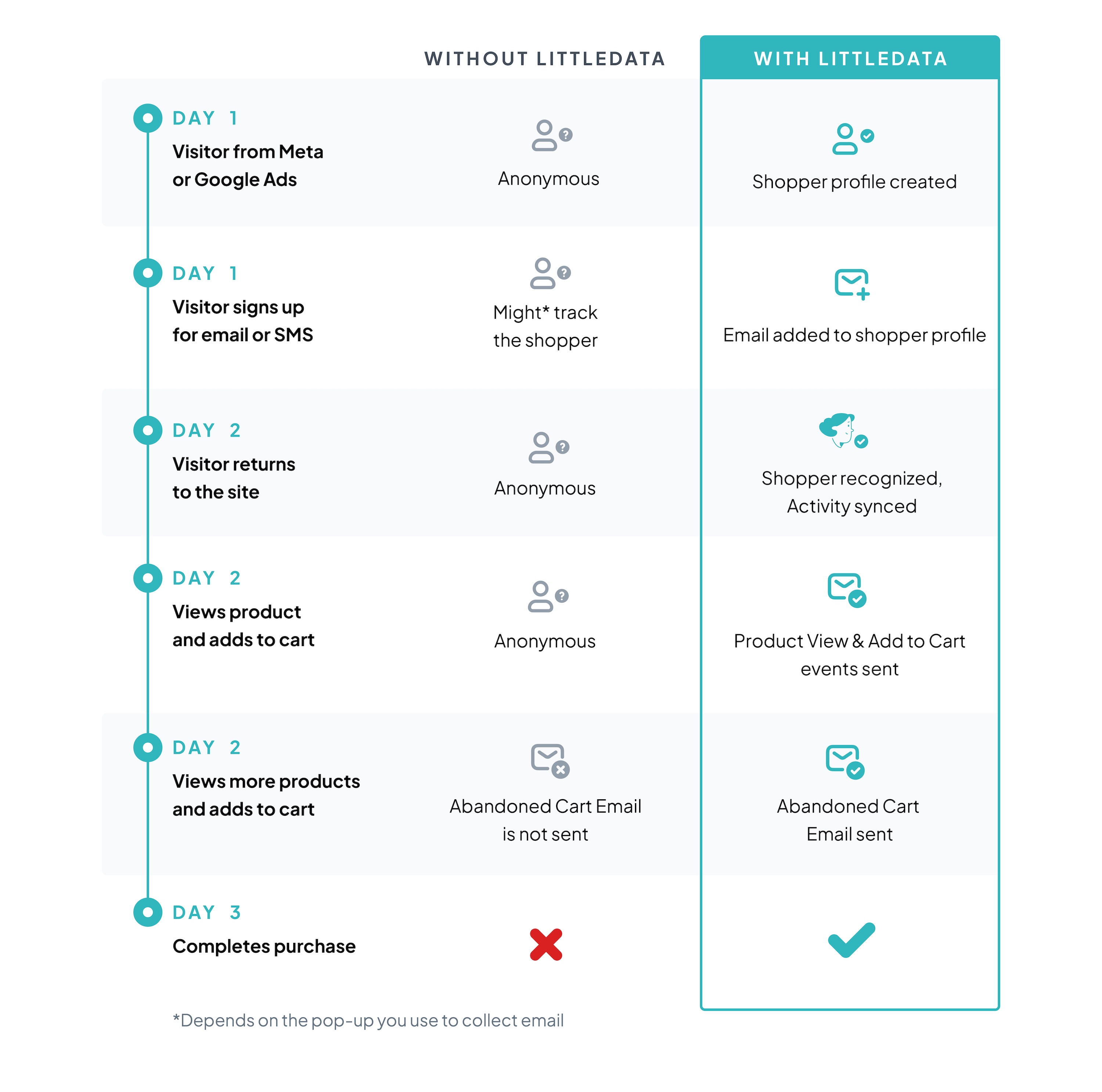
Take a common journey. A shopper arrives from a Meta or Google ad, signs up for a discount code, and leaves. A day later they come back, add items to the cart, and leave again.
- Browser tracking breaks - if the shopper uses an ad blocker, browses in Safari, or opts out of tracking, the return visit can't be linked to the profile created at signup.
- No trigger, no message - without a known identity, the cart abandonment flow never starts.
As a result, the shoppers closest to buying are often the ones your flows can't reach.

How does Littledata recognize returning shoppers?
Littledata builds a unified shopper profile on its servers by combining identifiers from each visit:
- Form submissions - pop-ups, coupon signups, and newsletter subscriptions.
- Account logins - Shopify customer accounts.
- Anonymous identifiers - Shopify and Google cookies.
- Device signals - user agent and IP address.
When a returning visitor matches a known profile, their Product Viewed and Add to Cart events reach Attentive with an externalIdentifiers field, so Attentive can link the event to the right subscriber and start the flow.
Which events does Littledata send to Attentive?
Both events are sent server-side and are available as flow triggers in Attentive once the connection is live.
| Event | When it fires | Use it for |
|---|---|---|
| Product Viewed | A shopper views a product | Browse abandonment, product-based splits |
| Add to Cart | A shopper adds a product to the cart | Cart abandonment, reminders and incentives |

Smarter retention marketing with Klaviyo + Attentive
Many brands run email in Klaviyo and SMS in Attentive. With Littledata's Klaviyo integration also connected, identity resolution gets a further boost.
- Shared identity - when Littledata identifies a visitor from a Klaviyo email click or signup, it passes the identified event to Attentive for SMS retargeting.
- Consistent messaging - abandonment audiences in Klaviyo and Attentive stay in sync, so shoppers get one coordinated journey.
Browser-only tracking vs. Littledata
What happens to a returning shopper's events, with and without Littledata's server-side identity resolution.
Browser-only tracking
Return visits unlinked
Ad blockers, Safari, and tracking opt-outs break the link between a return visit and the profile created at signup.
Events depend on the browser
Product views and adds to cart tracked in the browser are lost whenever the tag is blocked.
Separate identities
A shopper known in Klaviyo from an email click can still be anonymous to Attentive.
With Littledata
Returning shoppers recognized
Signups, logins, cookies, and device signals are combined on Littledata's servers to match the visit to a known profile.
Events sent server-side
Product Viewed and Add to Cart go straight to Attentive, with email, phone, and external identifiers attached.
Identity shared
Visitors identified from Klaviyo email clicks or signups are passed to Attentive for SMS retargeting.
How do I connect Shopify to Attentive?
Add the destination
In the Littledata dashboard, click Add destination and find Attentive.
Authorize Attentive
Click Connect, sign in to your Attentive account, and authorize the Littledata app.
Verify the connection
Littledata sends test events to confirm the connection and make the events available as flow triggers. Test events don't affect your current campaigns.
Build your flows
Use Product Viewed and Add to Cart from Littledata as the triggers for your browse and cart abandonment journeys.
Track Attentive campaigns in GA4 too Littledata's Google Analytics connection attributes Shopify orders to Attentive SMS campaigns, using the UTMs Attentive adds to links (for example utm_source attentive and utm_medium sms). See the GA4 setup guide