The Ultimate Guide to Klaviyo Flows
by Edward

Most brands only ever see a handful of Klaviyo accounts.
So “best practice” tends to mean a template someone copied from a course or what we did at my previous company.
This blog is different.
We analyzed flow triggers, splits, and complexity across 600 Klaviyo accounts to map which flows are popular, what’s actually working at scale, and what your setup is likely missing.
Our goal is to help you answer this question: “Does my Klaviyo account look normal for a brand at my stage? And if not, what’s the shortest path to fixing the gap?”
One caveat before we start: flows are only as good as the signals that trigger them. When your Klaviyo events are inconsistent, you either:
- Build generic flows (because you can’t trust the trigger context), OR
- Build complex flows (to patch gaps with logic), and get unpredictable results.
That signal + segmentation dependency shows up in your PnL numbers.
So here are the most common questions Shopify brands ask about Klaviyo flows answered using data from our research.
Learn how to double your Klaviyo flow performance.
1) How many Klaviyo flows should a Shopify brand have?
Most Shopify brands run a compact core of flows—around 12 live flows in Klaviyo is the typical baseline in our analysis of 600 accounts. The average is 19, but that’s because the distribution is skewed: a smaller group of brands run far more flows and pull the mean up. At the extreme end, we saw one outlier with 458 live flows, which usually points to either genuine operational complexity (deep catalogue, multiple regions, many segments) or flow sprawl over time (duplicated logic, legacy tests, and automations nobody owns).
So the practical answer is don’t aim for “19 flows.” Use it as a diagnostic: if you have fewer than ~12 live flows, you’re probably missing fundamentals that protect revenue. If you’re sitting at 50+ live flows, you may be in governance mode, where keeping logic consistent—and avoiding overlap, duplication, and broken segmentation—becomes the real bottleneck. For most brands, the sweet spot is simple: enough coverage to protect revenue, without creating a maintenance job.
Takeaway: Flow maturity is about “do we have the right flows, wired to reliable events?”
If you’re auditing flows, start with the triggers.
2) What are the most important Klaviyo flow triggers to set up first?
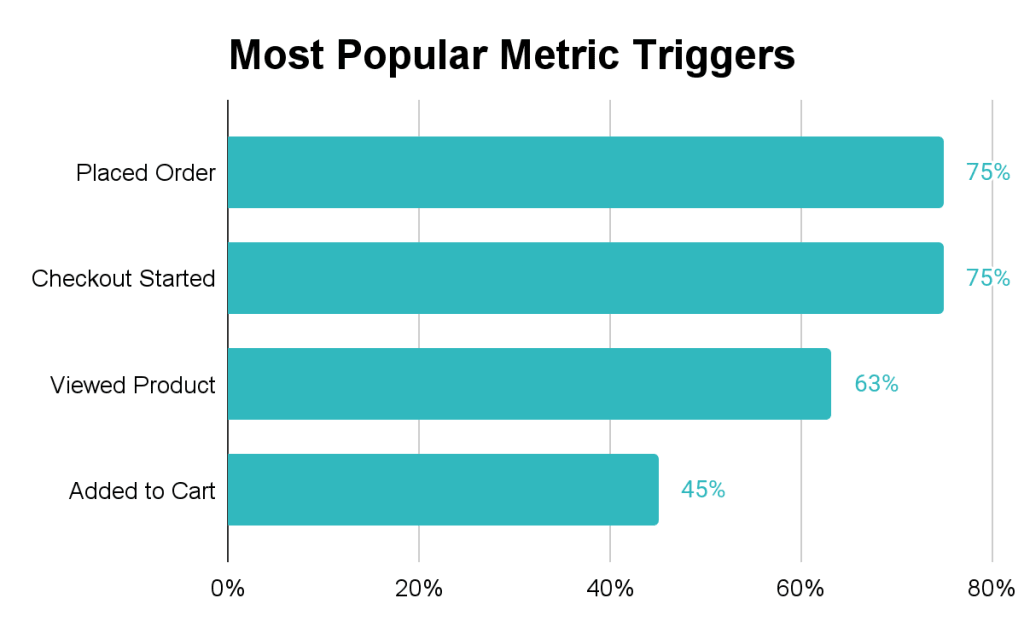
Start with the core four triggers that show up in almost every serious Klaviyo setup: Placed Order, Checkout Started, Viewed Product, and Added to Cart. In our dataset, 75% of Shopify brands had flows triggered by Placed Order and Checkout Started, while Viewed Product and Added to Cart were also common but clearly second-tier in adoption. The reason this top tier is so consistent is that it maps neatly to the only three lifecycle moments that reliably matter: intent forming (Viewed Product), intent spiking (Added to Cart / Checkout Started), and value realized (Placed Order). If you get these right, you can recover abandoned revenue and extend LTV. If you get them wrong, everything becomes guesswork.
The more interesting signal sits just behind that core: 33% of brands in our dataset are using Littledata versions of the same events. That isn’t “more triggers.” It’s brands trying to upgrade the quality of the triggers that drive their flows.
And there’s a good reason they bother—because “Added to Cart” sounds simple, but in practice it’s where tracking breaks first. Identity drops (especially across devices and browsers), duplicate events inflate intent, and inconsistent event properties make segmentation fragile. When the trigger is fuzzy, the automation built on top of it becomes fuzzy too: flows end up either overly generic (“nudge everyone”) or overly cautious (“don’t trust the signal enough to personalize”).
Takeaway: If you want Klaviyo flows to behave consistently, you need Shopify-first, server-side signals that don’t quietly drop purchases or identity when the storefront changes.
Learn how Littledata works with Klaviyo.
3) What’s the best way for Shopify brands to personalize Klaviyo flows?
The best way for Shopify brands to personalize Klaviyo flows is by using customer context first, then layering in event context only where it materially changes what you should say. In our analysis, flows using profile property splits (1,384) outnumbered flows using trigger-dimension splits (295) by about 5x, because profile-based personalization is more durable and easier to maintain at scale. Start with stable inputs: consent, country/region, language/locale, and customer type (VIP, B2B, subscriber vs non-subscriber). These properties don’t change minute-to-minute, so flows stay consistent even as catalogs, storefronts, and campaigns evolve.

Example questions to ask (because profile personalization is more durable):
- Are you opted in?
- What country are you in?
- What language should we use?
- Are you a subscriber / B2B / VIP?
Learn how to track Klaviyo campaigns in Google Analytics 4 (so you can prove segmentation impact).
That’s also why consent dominates real-world flow logic: gating messages by opt-in prevents flows from becoming spam engines, protects deliverability, and makes A/B tests cleaner because engagement metrics aren’t polluted by low-intent recipients. And location/locale shows up so often because international selling is now mainstream—relevance increasingly depends on market context, not just product interest. Once those foundations are in place, you can add event-property personalization (items/collections/value) where it’s worth the complexity—then prove the lift by tracking Klaviyo campaigns in GA4.

4) What are “trigger dimension splits” in Klaviyo, and when should you use them?
Trigger dimension splits are event-property branches—flow logic that uses details attached to the event that started the flow. For example: which product was viewed, what was in the cart, which collection the item belongs to, or the cart/order value. They’re one of the most powerful ways to make a flow feel genuinely relevant, because you’re responding to what someone actually did—not just who they are.
But they’re also the most fragile form of personalization, because they only work well when the underlying inputs are trustworthy. In practice, trigger-dimension personalization depends on stable product naming and taxonomy, consistent event properties, reliable identity resolution, and careful deduplication so you don’t message people based on phantom intent (duplicate “Added to Cart” events are the classic culprit). When those foundations aren’t in place, trigger-dimension splits quickly turn into brittle logic that breaks as catalogs evolve and tracking environments change.
That’s why most brands start with profile-based personalization—consent, tags, country/locale/language—because it’s durable and safe. Once those customer attributes are clean, trigger-dimension splits become a high-leverage upgrade: use them where the content truly changes (product education, cross-sell, replenishment timing), not as a blanket approach for every SKU.
Takeaway: If you want flows to feel relevant quickly, you need cleaner customer attributes to safely branch messaging.

5) How to segment Klaviyo flows by product category?
Segment Klaviyo flows by product category by branching on Collections or Categories (not individual product names). “Items” splits are often implemented as product-name splits, which is a fast path to relevance (“talk about the exact thing they looked at”) but becomes brittle as your catalog grows and naming conventions drift. The more scalable approach is to route customers based on Collections/Categories—which stay stable as SKUs come and go—and then, where needed, use $value to tier urgency or offer strategy. That gives you category-level relevance without turning your flow library into a maintenance job.
6) How do Shopify brands use Shopify Tags in Klaviyo flows (and why)?
Shopify brands use Shopify Tags in Klaviyo flows as a simple way to branch messaging by market context—most commonly language and subscriber status. In practice, tags like “en”, “newsletter-fr”, and subscriber markers show up as the logic that decides which version of a flow someone should receive.
Brands use tags because they’re easy to set, easy to reason about, and they let you branch flows without duplicating entire automations per language or region. The bigger implication is that Shopify Markets isn’t just a storefront decision. If your lifecycle flows ignore market identity, retention becomes “one-size-fits-none”—even if your storefront is beautifully localized.

7) Which Klaviyo flows get the most complicated, and why?
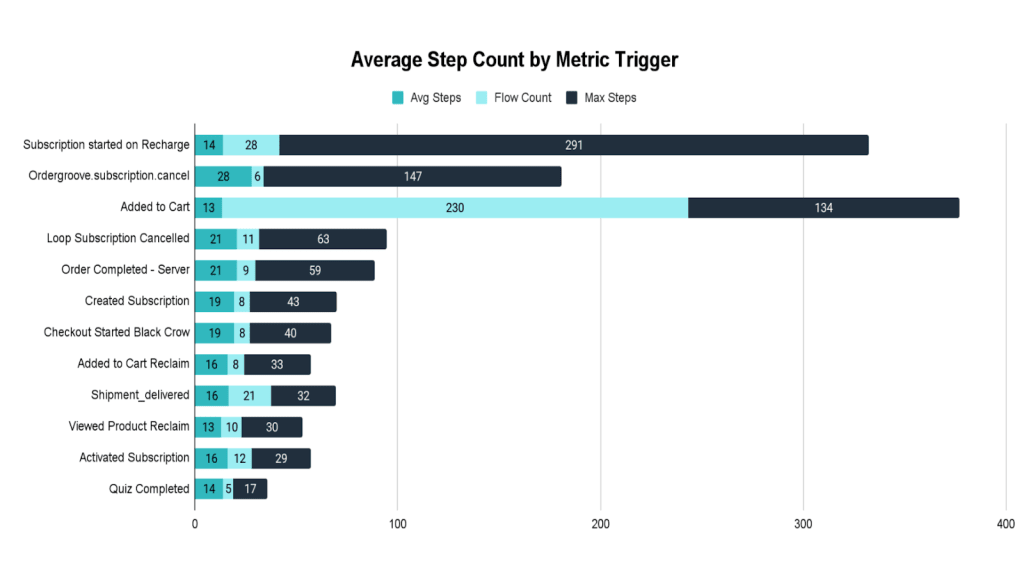
The most complicated Klaviyo flows are usually the ones solving the hardest business problem: stopping churn. Flow complexity is an output, not a goal—teams add steps when the problem demands it, or when the signals are trustworthy enough to support richer branching. In our dataset, the highest complexity clustered around subscription retention and cancellation triggers, because a cancellation save flow is essentially a decision tree: the offer, the objection handling, the timing and escalation, and the segmentation by subscriber type all need different paths.
Signal quality shows up here too. Events like “Order Completed – Server” tend to trigger longer, more reliable flows than client-side events, because the trigger is cleaner and identity is more consistent. In practice, stronger-signal triggers correlate with teams being willing to build longer, more branched flows because branching is only safe when the trigger is dependable.
Learn how to set up your Klaviyo flows using Littledata’s triggers.
8) What is an “Active on Site” flow in Klaviyo, and when does it make sense?
An “Active on Site” flow is a Klaviyo automation triggered by general site activity, rather than a specific product or cart action. It’s most useful as a browse-abandon fallback: when brands don’t have reliable product/cart context (or they simply want a lighter, simpler nudge), they trigger off “someone was active” instead. In our dataset, we found 89 flows triggered by the “Active on Site” metric, which shows it’s a common pattern.
Because the trigger is generic, the personalization has to come from somewhere else—and the split logic makes that obvious. These flows lean heavily on profile-level safeguards and light context: consent gating (to ensure opt-in), overlap prevention (“In-Flow”), basic interest hints (“Shopping For”), and then region/language for market relevance. That’s exactly what you’d expect: when the event doesn’t tell you much, the flow uses the profile to avoid spamming and to add just enough relevance to justify the message.
| Profile dimension | Flow count | Usage context |
| marketing_consent | 11 | Ensuring the user is opted in before sending. |
| properties[‘In-Flow’] | 10 | Custom logic to prevent overlapping with other active automations. |
| properties[‘Shopping For:’] | 6 | Personalizing based on self-identified interests (e.g., Men vs Women). |
| location[‘region’] | 5 | Geographic targeting or shipping-specific messaging. |
| properties[‘Language’] | 3 | Localization/Translation logic. |
The subject lines used in these flows follow a “soft reminder” or “helpful nudge” pattern. Here are the most common themes:
| Theme | Common subject lines |
| The nudge | Still thinking about it?Did you see something you liked? We saw you stopping by We Caught You Lookin’ |
| Helpful/Quiz | Need Help?Not sure where to start?Exploring Options? Start Here.{{ first_name }}, have you explored enough? |
| Incentives | Your 10% discount is about to expire! 10% OFF – Thanks for Checking Us Out!Get 10% off your purchase! |
| Trust/Social Proof | Real Feedback. Real Results.Our Best Sellers Are Flying Off the ShelvesDon’t take our word for it… |
Flows triggered by “Active on Site” are significantly less complex than “Abandoned Checkout” flows. They are primarily used as a general re-engagement tool with simple personalization based on profile-level data rather than specific event data.
9) What are the best post-purchase flows in Klaviyo to increase repeat purchases?
The best post-purchase Klaviyo flows are the ones that change what you say based on what the customer bought—because post-purchase is where segmentation is most justified. If you’re trying to increase repeat purchases (and LTV), this is the most under-priced lever: the customer has already converted, identity is usually stronger, and the event payload is richer—so you can branch safely without guessing.
In our analysis, post-purchase logic most commonly branches on Collections (417) and Items (350) first (because the follow-up content should differ by product), then layers in country (220 – shipping expectations, currency, localized promises), marketing consent (86 – whether you’re allowed to continue messaging), and Shopify Tags (68 – customer type like VIP/wholesale/first-time). That hierarchy is the playbook: start with product context, then add market and customer context.
| Dimension key | Flow count | Usage context |
| Collections | 417 | Sending specific content based on the collection purchased. |
| Items | 350 | Product-specific follow-ups (e.g., instructions for a specific item). |
| location[‘country’] | 220 | Shipping expectations or localized language/currency. |
| marketing_consent | 86 | Checking if the buyer opted into marketing during checkout. |
| properties[‘Shopify Tags’] | 68 | Segmenting by customer types (e.g., VIP, Wholesale, First-time). |
The messaging patterns reflect that maturity too. The most common post-purchase subject line categories cluster into four jobs: gratitude & confirmation (reassurance and relationship), cross-sell / product recs (pairing and next order), retention & feedback (closing the loop and prompting return intent), and customer education (help the customer get value, which reduces regret and increases repeat rate). If you build those four flows—and branch them primarily by collection/item, with light market/customer overlays—you get repeat purchases without turning your flow library into a maintenance job.
| Category | Top subject lines |
| Gratitude & Confirmation | Thank you for your purchase!Wow, thank you again!Thank you for your order!Welcome to the Family! |
| Cross-sell / Product Recs | We’ve found your perfect pairing Discover Your Ideal PairingReady to complete your collection?You might also like… |
| Retention & Feedback | It’s been a while…We’ve missed you.So, what’d you think?How did we do? |
| Customer Education | Uncomfortable earplugs? We won’t hear of it! Have you tried out my interactive content yet?You’re almost done with your jar! |
How to audit and improve Klaviyo flows using this research?
Start with the pattern that shows up consistently across real Klaviyo accounts: most brands run a compact core of flows, and the real difference between “basic” and “advanced” isn’t volume—it’s whether the triggers are trustworthy and the segmentation is maintainable.
That’s why profile-based personalization shows up so much more than trigger dimension branching. Consent, language, and market context stay stable, while cart and browse signals are where identity drops, duplicates creep in, and event properties drift.
Our recommendation for Shopify brands is: audit your flows in this order: first, check whether your highest-leverage triggers (Checkout Started and Placed Order) are complete, deduplicated, and identity-safe. Then check whether your segmentation relies on durable attributes (consent, country/locale, customer type) before you add fragile event-property branching. The goal is simple: make sure the right people enter the flow with the right context, so your flows can be confidently specific—without becoming brittle or turning into a maintenance job.
Appendix
Top 40 Most Popular Metric Triggers
This table shows which event metrics are most commonly used to start flows and what percentage of total Klaviyo accounts utilize them.
| Rank | Metric Trigger | Account Count | % of Accounts |
| 1 | Placed Order | 313 | 74.7% |
| 2 | Checkout Started | 313 | 74.7% |
| 3 | Viewed Product | 264 | 63.0% |
| 4 | Added to Cart | 188 | 44.9% |
| 5 | Fulfilled Order | 126 | 30.1% |
| 6 | Subscribed to Back in Stock | 114 | 27.2% |
| 7 | Active on Site | 82 | 19.6% |
| 8 | Subscribed to SMS Marketing | 71 | 16.9% |
| 9 | Delivered Shipment | 37 | 8.8% |
| 10 | Ordered Product | 36 | 8.6% |
| 11 | Ready to review | 30 | 7.2% |
| 12 | Subscription cancelled on ReCharge | 25 | 6.0% |
| 13 | Eligible for Okendo Review Request | 18 | 4.3% |
| 14 | Subscription started on ReCharge | 17 | 4.1% |
| 15 | Swell Customer Birthday | 17 | 4.1% |
| 16 | Order upcoming on ReCharge | 15 | 3.6% |
| 17 | Subscribed to List | 15 | 3.6% |
| 18 | Viewed Collection | 14 | 3.3% |
| 19 | Wonderment – Out for Delivery | 13 | 3.1% |
| 20 | Swell Tier Earned | 13 | 3.1% |
| 21 | Marked Out for Delivery | 13 | 3.1% |
| 22 | Wonderment – Shipment Delivered | 13 | 3.1% |
| 23 | Swell Referral Completed | 13 | 3.1% |
| 24 | Subscribed to Email Marketing | 13 | 3.1% |
| 25 | Confirmed Shipment | 12 | 2.9% |
| 26 | Skio: Subscription Cancelled | 12 | 2.9% |
| 27 | Checkout Started Reclaim | 11 | 2.6% |
| 28 | Eligible for Judge.me Review Request | 11 | 2.6% |
| 29 | Swell Referral Share | 11 | 2.6% |
| 30 | Viewed Product Reclaim | 10 | 2.4% |
| 31 | Wonderment – Carrier Picked Up | 10 | 2.4% |
| 32 | Skio: Billing Reminder Notification | 10 | 2.4% |
| 33 | Swym-backinstock | 10 | 2.4% |
| 34 | Swell Redemption Reminder | 9 | 2.1% |
| 35 | Wonderment – Shipment Stalled | 9 | 2.1% |
| 36 | Wonderment – Attempted Delivery | 9 | 2.1% |
| 37 | Skio: Billing Attempt Failed | 9 | 2.1% |
| 38 | Fulfilled Partial Order | 9 | 2.1% |
| 39 | Skio: New Subscription Created | 9 | 2.1% |
| 40 | Filled Out Form | 8 | 1.9% |
| 41 | Form submitted by profile | 8 | 1.9% |
Flow Split Analysis
Split Distribution
- Total flows using Trigger Dimension splits: 295
- Total flows using Profile Property splits: 1,384
Top 20 Trigger Dimensions for Splits
Trigger dimensions are properties of the event that started the flow (e.g., the specific product in a “Viewed Product” event).
| Rank | Dimension Key | Flow Count |
| 1 | Items | 55 |
| 2 | $value | 53 |
| 3 | Collections | 51 |
| 4 | Categories | 51 |
| 5 | Name | 24 |
| 6 | message_step | 9 |
| 7 | tags | 8 |
| 8 | cancellation_reason | 6 |
| 9 | Source Name | 6 |
| 10 | CollectionName | 4 |
| 11 | cancellationReason | 4 |
| 12 | Price | 4 |
| 13 | pick_up_until | 4 |
| 14 | Item Names | 3 |
| 15 | order_type_tag | 3 |
| 16 | Brand | 3 |
| 17 | Item Count | 3 |
| 18 | Variant Name | 3 |
| 19 | Product Name | 3 |
| 20 | merchant | 3 |
Top 20 Profile Dimensions for Splits
Profile dimensions are properties of the customer (e.g., their country or historical tags).
| Rank | Profile Property | Flow Count |
| 1 | marketing_consent | 489 |
| 2 | properties[‘Shopify Tags’] | 157 |
| 3 | location[‘country’] | 119 |
| 4 | properties[‘$locale_country’] | 44 |
| 5 | properties[‘$locale_language’] | 42 |
| 6 | location[‘region’] | 41 |
| 7 | properties[‘coupon_code’] | 41 |
| 8 | properties[‘rc_active_subscriber’] | 38 |
| 9 | properties[‘$source’] | 37 |
| 10 | properties[‘$locale’] | 37 |
| 11 | properties[‘Language’] | 32 |
| 12 | 32 | |
| 13 | properties[‘skio_hasActiveSubscription’] | 30 |
| 14 | properties[‘Langue’] | 29 |
| 15 | properties[‘$loop_active_subscriber’] | 25 |
| 16 | properties[‘blackcrow_identified’] | 23 |
| 17 | location[‘address1’] | 21 |
| 18 | location[‘zip’] | 19 |
| 19 | properties[‘$language’] | 18 |
| 20 | properties[‘Latest Postscript Coupon’] | 18 |
Shopify Tags Splits
A total of 35 brands are using Shopify Tags to split their flows. Here are the most common tag values being used across their automation logic:
| Rank | Shopify Tag Value | Occurrences in Flows |
| 1 | en (Likely for English language segmenting) | 166 |
| 2 | Active Subscriber | 34 |
| 3 | newsletter-es (Spanish newsletter) | 28 |
| 4 | newsletter-fr (French newsletter) | 17 |
| 5 | active_subscriber (Variation of Rank 2) | 10 |
| 6 | b2b | 10 |
| 7 | inactive_subscriber | 9 |
| 8 | hascustomeraccount | 8 |
| 9 | English-Speaking | 7 |
| 10 | Trade | 7 |
Average Step Count by Metric Trigger
This analysis highlights which flow triggers result in the most complex automations. Subscription-related events (cancellations and starts) consistently drive the highest step counts.
| Rank | Metric Trigger Name | Avg Steps | Flow Count | Max Steps |
| 1 | ordergroove.subscription.cancel | 27.83 | 6 | 147 |
| 2 | Loop Subscription Cancelled | 20.73 | 11 | 63 |
| 3 | Order Completed – Server | 20.56 | 9 | 59 |
| 4 | Created Subscription | 19.00 | 8 | 43 |
| 5 | Loop Subscription Paused | 16.80 | 5 | 28 |
| 6 | shipment_delivered | 16.33 | 21 | 32 |
| 7 | Activated Subscription | 16.00 | 12 | 29 |
| 8 | Added to Cart Reclaim | 16.00 | 8 | 33 |
| 9 | Quiz Completed | 13.80 | 5 | 17 |
| 10 | Subscription started on ReCharge | 13.57 | 28 | 291 |
| 11 | Added to Cart | 13.15 | 230 | 134 |
| 12 | Viewed Product Reclaim | 13.00 | 10 | 30 |